Moodle: WIRIS MathType and ChemType for Atto
This article has not been updated recently and may contain dated material.
Description
WIRIS MathType and ChemType for Atto is a Moodle plugin that allows users to type and handwrite mathematical and chemical notation directly in the Atto text editor. This is done through an equation editor that is built in to the text editor, which adds the notation typed in the MathType editor to the Atto text editor when saved. The result is a seamless combination of the user's text and equations or formulas:
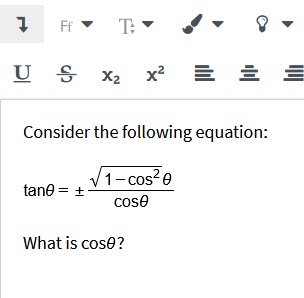
In the above example, the equation has been added using the MathType editor.
Using MathType and ChemType
This tool adds two new buttons to the Atto menu bar:
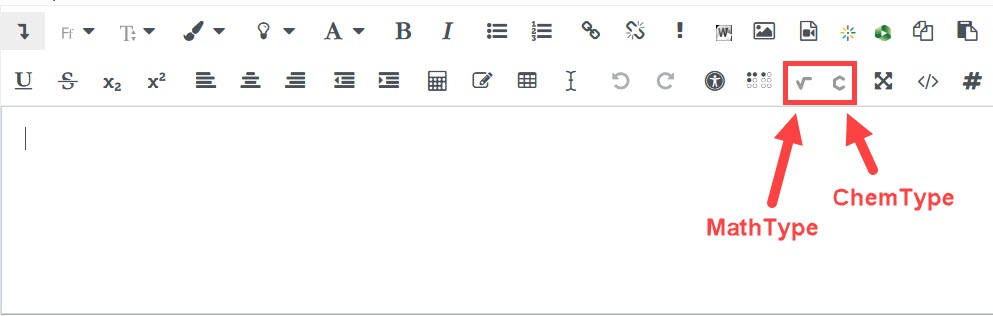
Clicking either button will open an equation editor pop-up where you can select various symbols, notation, and other functionalities. There are ten tabs in both the MathType and ChemType editors.
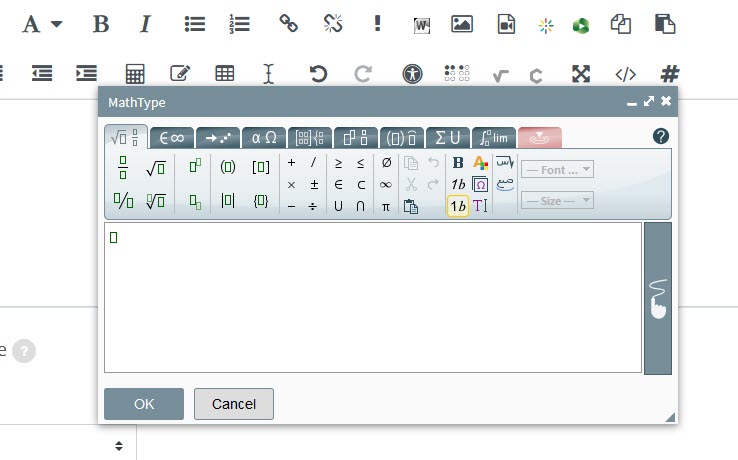
For more information on each tab and general navigation, see the MathType documentation for the Toolbar and Icons.
Need More Help?
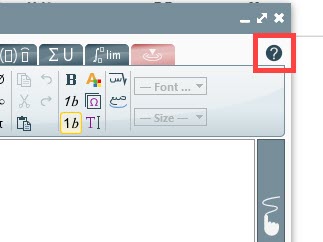
For help with using MathType, including tutorials and accessibility information, see the MathType documentation MathType for Moodle. You can also click on the question mark icon in the top right corner of the MathType editor to find a user guide and more technical and accessibility documentation.
General Information
The Faculty Technology Center (FTC) provides IT support, consultations, and innovative solutions to faculty and graduate teaching assistants tailored to their individual teaching, research, and operational needs.
Training & Support Services
- Classes & Workshops: Regularly scheduled workshops include topics that focus on the use of software or other technologies that ultimately promote the mission of teaching, learning, and/or research at LSU. See the list of current offerings and register online at http://training.lsu.edu. The FTC also offers group/department training and consultations upon request.
- One-on-One Consultations: Faculty can meet with an FTC representative one-on-one (or in small groups) in order to receive individualized assistance with specific technological problems they are encountering or to discuss new ways in which technology can improve the effectiveness of their teaching, learning, or research. Consultations can be scheduled and can take place at the FTC or in a location of the faculty member’s choice. If you are in need of a consultation, please contact the FTC to schedule one.
- Peer Group Facilitation and Events: The Faculty Technology Center is available to Sponsor Meetings among faculty in the form of Coffee Talks, Tech Talks, Speed Geeking, or other faculty peer group meetings for those who wish to share their experiences, concerns, challenges, and successes in implementing technology into their teaching and research. This is an opportunity for LSU Faculty to present to their peers. Group participation will be highly encouraged. If you are interested in requesting a meeting or presenting at an event, please contact the FTC.
- Moodle Support: The FTC offers Moodle support by phone, email, Zoom, as well as in-person by request. Our goal is to provide faculty with individualized, “just-in-time” assistance with the academic technology leveraged for teaching and learning at LSU.
FTC Contact Information
Website: https://facultysupport.lsu.edu/support/
Phone: (225) 578-3375, option 2
Email: ftc@lsu.edu
Location & Hours
Charles E. Coates Hall room 173
186 Tower Drive
8:00 - 4:30 Monday through Friday
During busy periods, "hypercare" hours may be invoked to include extended weekday hours as well as some weekend hours.
Related Links
Moodle: LSU Overview
Panopto: LSU Overview
LSU Online: Overview
LSU Support & Policy Statements
Service Desk Contact Information
Policy Statements
20403
9/5/2025 4:43:23 PM